

Project Objectives & Challenges
Nobody asked me to redesign LiveJournal.
I was using the mobile experience, kept running into usability problems, got annoyed enough by them, and decided to figure out how I would make it better. 🙂
At the time, LiveJournal had two different mobile experiences: a dedicated mobile site and a mobile version of the full site. Both had strengths, but both also had their own UI, UX, navigation, and functionality problems.
My goal was to analyze both experiences, understand what worked and what didn’t, and create a new mobile experience that addressed the problems while preserving the useful functionality of both.
UX Analysis
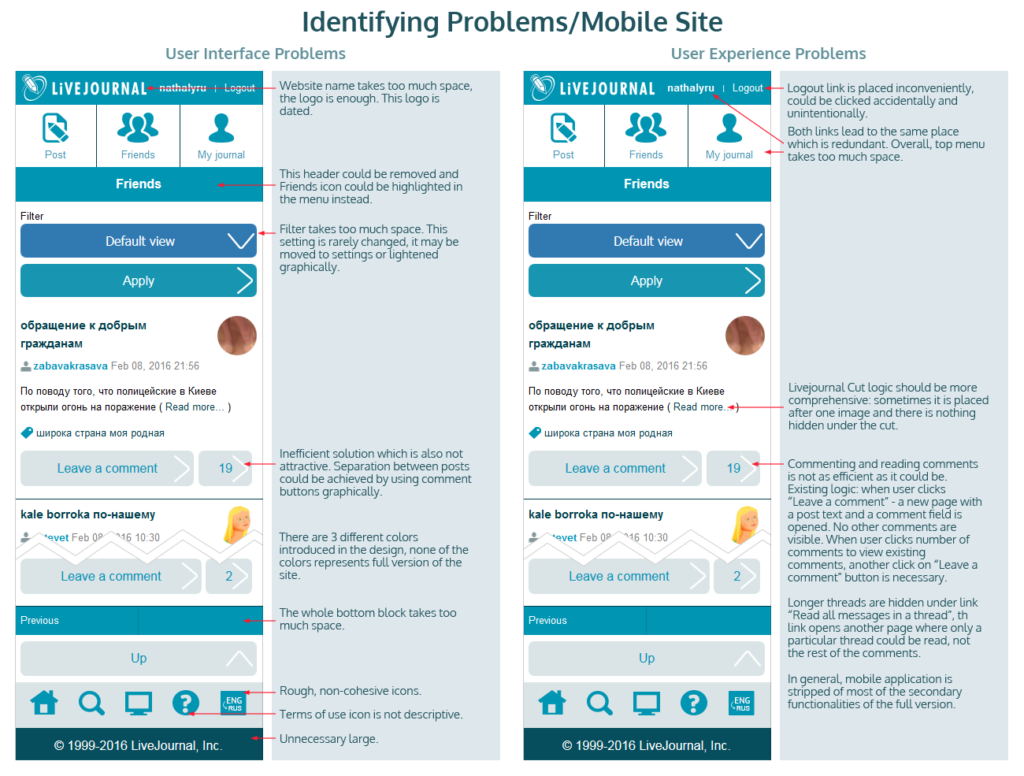
Before redesigning anything, I conducted a side-by-side heuristic and usability analysis of both existing mobile experiences, documenting UI, interaction, navigation, functionality, and mobile accessibility problems.
The analysis included:
- UI and UX problem identification
- Side-by-side comparison of both mobile experiences
- Gesture and thumb-reach analysis
- One-handed mobile usability
- Navigation and information hierarchy
- Commenting and interaction workflows
- Redundant controls and functionality
- Icon and visual consistency
- Mobile screen-space utilization
- Feature gaps between the two experiences
I used those findings as the basis for the redesigned experience.
Design & Execution
- Redesigned the mobile interface
- Reworked navigation and interaction patterns
- Simplified key user flows
- Improved accessibility of important actions
- Created high-fidelity wireframes
- Created storyboards
- Developed a new visual direction
- Adobe Photoshop
The Result


This wasn’t client work. It wasn’t an interview assignment. Nobody paid me or asked me to do it.
I simply saw a product experience that wasn’t working particularly well, wanted to understand why, and ended up redesigning it.
I don’t only look for product problems when somebody hires me to find them.